Roku Search · for Control4
Search a show.
Watch it on the Roku.
Title search, season and episode picks, YouTube TV channels and one shared Favorites list - on the Control4 app, T4 & T5 touch screens, Halo and SR-260 remotes (favorites only).
15 days with every feature · no key to type
What the homeowner gets
Everything they reach for, in one place.
The Roku becomes a first-class Control4 source: found by name, played by episode, saved once and shared by every screen in the house.
- 01
Title search on the touch screen
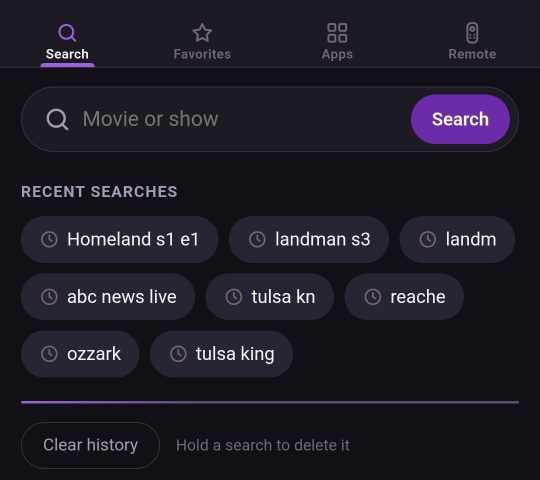
Search any movie or show from the Control4 app or a touch screen. Misspellings are corrected ("ozzark" finds Ozark), and the results show posters and where each title streams.
- 02
Straight to the episode
Pick a season and episode and it plays: Netflix and Hulu episodes start directly, Prime Video opens the movie or the right season. Other apps open with one tap.
- 03
YouTube TV channels
Save the channel or recording that is playing on the Roku with one tap, and play it again later.
- 04
One Favorites list, everywhere or by room
Shows, episodes, channels and apps in one list, shared by the Control4 app, T4 & T5 touch screens, Halo and SR-260 remotes, with posters and app icons.
- 05
A proper remote
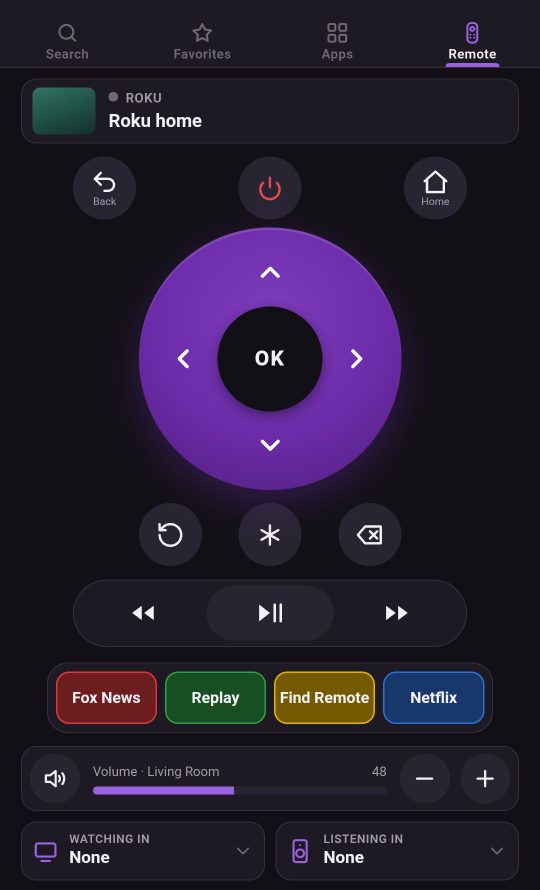
Now Playing, Roku keys, room volume and power. Easily add rooms to watching-in or listening-in with the Control4 app and on touch screens.
- 06
Four color buttons
Red, green, yellow and blue buttons, set in the driver for programming or for the homeowner to choose. The homeowner can pick a key, an app or a favorite and name the button, all on the device. The "Find Remote" key makes the room's Control4 remote beep.
The app
One app, four tabs.
It opens from the room's Roku button in the Control4 app and on touch screens.
- SearchType a movie or show; recent searches stay one tap away.
- FavoritesEverything saved, plus "Save what's playing".
- AppsEvery app on the Roku, with its icon.
- RemoteRoku keys, color buttons, room volume, and where it is being watched or listened to.
For dealers
Built the way integrators work.
Everything you expect from a Control4 media driver, plus programming hooks for the new features - and licensing that stays out of the way.
In Composer
- Finds Roku players on the network by itself
- App mini drivers, so "Watch Netflix" works on Halo voice
- Events: Red / Green / Yellow / Blue Button Pressed
- Commands: PlayTitle, Search, DeepLinkContent, Press Color Button
- Variables: CURRENT_APP and LAST_CONTENT_*
Licensing
- The trial starts by itself - no key to type
- One license per controller, shared by every Roku in the project
- Replace the controller and the license follows the project
- Homeowners renew title search themselves from the app
How the license works
Try it. Buy once. Renew search yearly.
Free trial
15 days with every feature, from the moment the driver is added. One trial per controller.
Buy once
The license is yours for good on that controller, and includes a year of title search.
Renew title search
Near the end the app shows a Renew link. If it lapses, only search and adding to favorites stop: the remote, apps, favorites and YouTube TV keep working.
Dealer pricing
Control4 dealers buy at dealer prices.
Create a dealer account with your Control4 dealer number. Once we confirm it, dealer pricing applies to every license you buy.